![hdr_logo.png]](https://go.ninesliving.com/hs-fs/hubfs/j1640189779864/hdr_logo.png?height=40&name=hdr_logo.png)
Your Nines account includes a starter Protocols template with 13 chapters. The template was developed by Marta Perrone, a Nines advisor and household management expert.
Protocols are designed for longer-form household policies, operating standards, and detailed procedures. The template chapters provide a starting point for organizing this information, but you can customize, reorder, or delete them to fit your household. You do not need to use every chapter.
Nines Best Practice: Keep information in the Nines feature where it is most useful. Protocols are best for guidance that applies broadly to how the household operates. Resident preferences, staff and vendor details, inventories, checklists, schedules, and activity records are often easier to maintain in their respective Nines features.
Create and manage chapters and sections
You can customize Protocols by adding, editing, deleting, or reordering chapters and sections.
- Add a chapter or section: Click +, enter a title, and confirm.
- Edit or delete a chapter or section: Click … next to the item and select Edit or Delete.
- Reorder chapters: Click … next to Chapters and select Reorder.
- Add or format section content: Open the section and click Edit. You can add text and upload supporting images or PDFs.
Open or print Protocols as a PDF
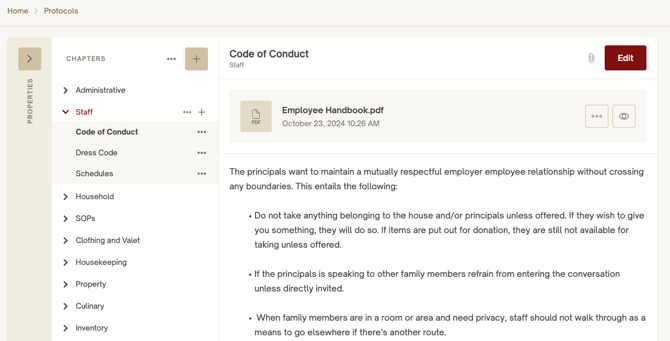
To open a formatted, Nines-branded PDF of your Protocols, click … next to Chapters and select Open as PDF. From the PDF viewer, you can print the document or save a copy using the viewer’s print or download controls.
Suggested Chapters
Use the suggestions below as prompts. Adapt them to your household and include only the information your team needs.
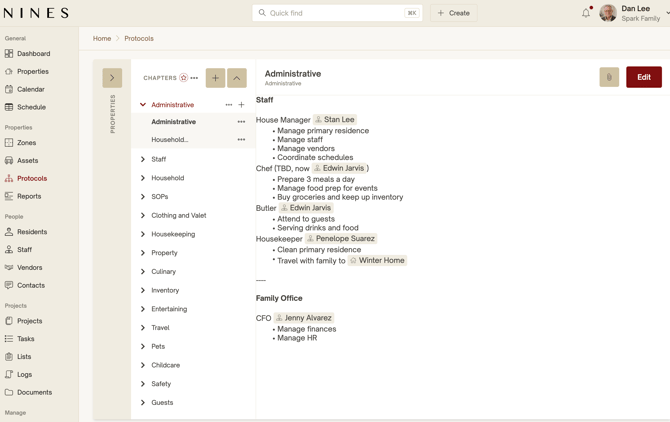
Administrative
- Describe how the household is managed, including roles and decision-making responsibilities.
- Set guidelines for communication, approvals, and handling issues.
- Document general administrative policies and procedures.
Nines Best Practice: Use Documents for supporting administrative records.
Staff
- Establish standards for staff conduct, appearance, discretion, and interactions with residents and guests.
- Outline workplace policies, confidentiality requirements, and professional etiquette.
- Document general employment policies and onboarding standards.
Nines Best Practice: Use People for staff profiles, Tasks for assignments, and Documents for employment agreements and supporting HR records.
Household
- Define the household’s overall service philosophy and operating standards.
- Establish guidelines for maintaining the home when residents are present or away.
- Document household-wide procedures for privacy, access, and daily operations.
Nines Best Practice: Use Resident profiles for individual preferences, Zones for room-specific information, and Tasks for recurring household routines.
Clothing and Valet
- Establish standards for garment care, including how to handle delicate fabrics and maintain wardrobes.
- Outline procedures for storing and preserving clothing and accessories.
- Document general procedures for coordinating laundry, tailoring, and dry-cleaning services.
Nines Best Practice: Use Lists for recurring wardrobe-care and packing checklists. Keep individual clothing preferences in Resident profiles.
Housekeeping
- Define housekeeping standards, service expectations, and presentation requirements.
- Establish general cleaning procedures and special-care standards for delicate surfaces and furnishings.
- Document expectations for privacy and discretion while cleaning around residents and guests.
Nines Best Practice: Use Lists for room-specific cleaning checklists and connect them to the appropriate Zones, so staff can find instructions where they need them. Use Tasks for scheduled or assigned cleaning responsibilities.
Property
- Establish property-management standards and expectations for preventive maintenance.
- Outline procedures for vendor supervision, quality control, and reporting property concerns.
Nines Best Practice: Use Assets for equipment and home systems, Tasks for maintenance reminders, Logs for service history, Documents for warranties and manuals, and Lists for seasonal opening and closing checklists.
Culinary
- Establish standards for meal service, kitchen operations, and food presentation.
- Document food safety, sanitation, storage, and kitchen hygiene procedures.
- Define general procedures for coordinating kitchen service.
Nines Best Practice: Use Resident and Contact profiles for dietary requirements and dining preferences. Create Lists for kitchen opening and closing procedures or grocery shopping.
Inventory
- Establish inventory-management policies, purchasing authority, and approval requirements.
- Outline procedures for purchasing, receiving, inspecting, and documenting deliveries.
- Document standards for expense reporting, receipt handling, and inventory accountability.
Nines Best Practice: Use Assets to track inventory quantities and low-stock thresholds. Create Tasks with checklists for assigned purchasing or restocking responsibilities.
Entertaining
- Establish standards for hospitality, guest service, and events.
- Outline procedures for coordinating in-house staff and outside vendors.
- Document service standards and procedures for formal and informal entertaining.
Nines Best Practice: Use Events for scheduled gatherings, Projects for event preparation, Lists for cleaning checklists, Tasks for assigned responsibilities, and People for vendor information.
Travel
- Establish standards for travel preparation, coordination, and communication.
- Outline procedures for managing travel changes and unexpected disruptions.
- Document staff responsibilities and household operations while residents are traveling.
Nines Best Practice: Use Resident profiles for individual travel preferences, Events for itineraries, Lists for packing and departure checklists, and People for travel agents and service providers.
Pets
- Establish general policies for pet care, handling, hygiene, and safety.
- Define caregiver responsibilities, communication expectations, and escalation procedures.
- Document emergency care and response procedures for household pets.
Nines Best Practice: Use the Important Information section on the Resident Pet Profile for relevant pet details. Use People for veterinarians and caregivers, Tasks for scheduled care, Lists for recurring pet-care checklists, and Documents for records.
Childcare
- Establish childcare policies, supervision standards, and expectations for caregivers.
- Define caregiver authority, communication protocols, and escalation procedures.
- Document procedures for child safety, emergencies, and coordination among caregivers.
Nines Best Practice: Use Resident profiles for children’s preferences and care information, People for caregivers and emergency contacts, Events for activities and schedules, and Tasks for assigned responsibilities.
Safety
- Establish household safety, security, and emergency-preparedness policies.
- Document procedures for emergency response, evacuation, and incident escalation.
- Outline staff safety-training requirements, emergency readiness, and incident reporting.
Nines Best Practice: Use Assets for emergency equipment and safety systems, Zones for equipment locations, Lists for emergency-preparation checklists, Tasks for inspections and drills, and Logs for documenting incidents.
Final tips
Start with what your household needs. The chapters are a starting point, not a requirement. Customize the structure to reflect your household’s operations and avoid creating unnecessary content.
Use Protocols for the bigger picture. Protocols are most useful for documenting the policies, standards, and detailed procedures that guide how your household operates. Other Nines features can help your team carry out those procedures and maintain related records.
Link to related information with Mentions. Use #mentions to reference Nines objects and @mentions to reference people directly in your Protocols. These references help your team navigate to related zones, people, assets, and records, connecting household guidance to the information that supports it.