![hdr_logo.png]](https://go.ninesliving.com/hs-fs/hubfs/j1640189779864/hdr_logo.png?height=40&name=hdr_logo.png)
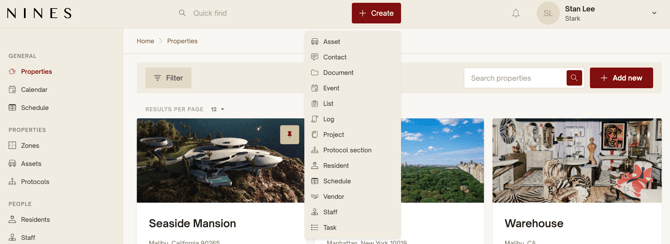
At the top of your Nines account, you’ll see a persistent red “+ Create” button — your shortcut for quickly adding anything new, no matter where you are in the platform.
This quick-create button allows you to add Tasks, Logs, Assets, Vendors, Documents, Contacts, and more, without needing to navigate to a specific tab. It’s especially helpful for team members on the go — for example, a staff member logging a completed repair, or a principal assigning a quick task — without stopping to figure out where to enter it.
When you click the “+ Create” button, you’ll see a menu of options based on your permission level. Each form is streamlined to include just the essential fields, making it fast and easy to capture what matters in the moment.
Whether you're logging a vendor visit, adding a new piece of equipment, or creating a reminder for next week, the quick-create tool helps you stay organized without interrupting your workflow.