![hdr_logo.png]](https://go.ninesliving.com/hs-fs/hubfs/j1640189779864/hdr_logo.png?height=40&name=hdr_logo.png)
Tags add an extra level of organization beyond categories, helping you organize related information across Nines. For example, use “Summer Opening” to group preparation tasks, walkthrough logs, and reference documents, or “Storm Preparation” to bring together relevant assets, lists, and vendor contacts.
Tags are optional—you are not required to add them to any item. Once created, a tag is available to use across all objects in your account.
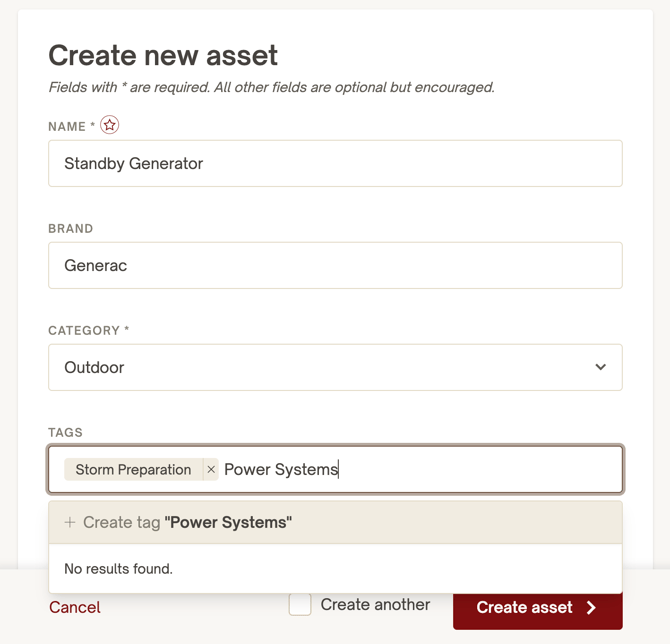
Add and edit tags
Tags can currently be added to Properties, Zones, Assets, Residents, Staff, Vendors, Contacts, Events, Projects, Tasks, Lists, Logs, Documents
When creating or editing an item, use the Tags field to select existing tags or add a new one. Save the item to apply your changes.
To change the tags assigned to an existing item, open it for editing, update the Tags field, and save. Reuse existing tags whenever possible to keep naming consistent and avoid duplicates.
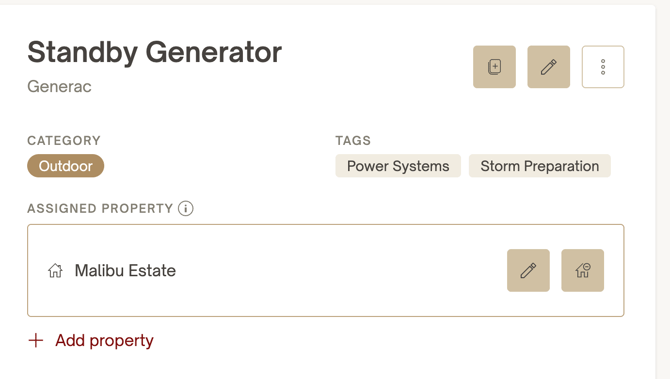
Tags appear on both overview and detail pages, making it easy to see how an item is organized.
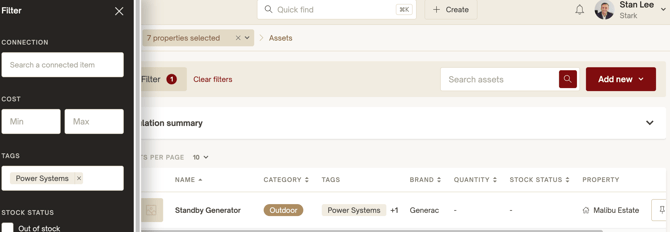
Filter and search by tags
Use tags in filters to narrow the items shown in an overview. You can also use Quick Find with a tag and a keyword to find related information across different objects in your account.
A dedicated tag overview page is coming soon. It will show all items associated with a particular tag in one place. For now, use Quick Find with a tag in combination with a keyword.
Tags versus categories
Categories provide centrally managed organization and are linked to permissions. Tags provide flexible, additional groupings across objects, with no central management or implications for permissions. Adding or removing a tag does not change who can access an item.
Use categories for your established classifications and tags for shared topics, activities, or initiatives that organize information across those classifications.
Best practices and current limitations
- Keep tags useful. Choose terms your team will use to search or filter, such as “Guest Readiness” or “Seasonal Maintenance.”
- Use consistent names. Reuse an existing tag instead of creating a slightly different version.
- Apply tags selectively. Add them when they help organize information; every item does not need a tag.
- Update items individually. Bulk editing and deletion of tags are not yet available. To change an item’s assigned tags, edit that item.