![hdr_logo.png]](https://go.ninesliving.com/hs-fs/hubfs/j1640189779864/hdr_logo.png?height=40&name=hdr_logo.png)
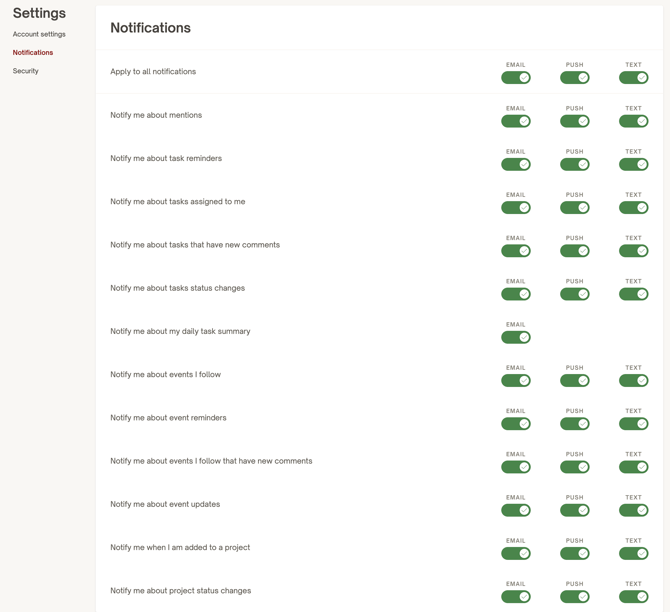
To receive notifications, you have to turn on Notifications based on your preferences in your account settings. You can receive notifications via email, mobile app push, or text message. You will always see all notifications within your account in the top right under the bell icon.
Currently, you could receive these notifications:
- Mention. You will receive notifications about mentions if another user tags you using the @ sign in a Log or Description/Important Information field box or comments.
- Task reminder. You will receive task reminders if you are the assignee of a Task with one or multiple Reminders, which you can set when creating the Task.
- Task assigned. You will receive notifications for Tasks assigned to you when a creator of a Task adds you as one of the Assignees.
- Task comment. You will receive notifications for Tasks that have new comments if you are the creator, assignee, or follower of a Task and another user leaves a comment on this Task. You need to be mentioned in the comment to receive the notification.
- Task status change. You will receive notifications for Tasks status changes if you are the creator, assignee, or follower of a Task and another user changes the Status field on this Task (or the system automatically updates the Status to Overdue because the Task due date is in the past).
- Daily task summary. You will receive an email in the morning with all outstanding tasks for that day, while also listing all tasks completed the day before.
- Events followed. You will receive notifications for Events that you have been added to as a follower. This will then also allow you to filter the calendar for all those event.
- Event reminder. You will receive reminders if you are the follower of an Event with one or multiple Reminders, which you can set when creating the Event.
- Event comment. You will receive notifications for Events that have new comments if you are the creator or follower of a Task and another user leaves a comment on this Event. You need to be mentioned in the comment to receive the notification.
- Event updated. You will receive notifications for Events that have been rescheduled, and that you are the creator or follower of.
- Project added. You will receive notifications for Projects when a creator of a Project adds you as project manager or follower.
- Project status change. You will receive notifications for Project status changes if you are the creator, project manager, or follower of a Project and another user changes the Status field on this Project (or the system automatically updates the Status to Overdue because the Project due date is in the past).